AI code review that blocks bad merges
AI CodeOps reviews the real diff of every AI session, records findings with a severity, and holds the pull request while a high or critical finding is open.
In AI CodeOps, review is a step every session with a code change goes through: an AI review reads the actual diff and records each problem as a finding with a severity, a category and a recommendation. Open findings of high or critical severity hold the change, so it cannot become a pull request, or be merged from the console, until someone fixes or triages them.
A single model reviewing its own work tends to miss the same things twice. So review in AI CodeOps has two layers. Review agents inside the workflow look at the plan and the proposed change from different angles. Then, once the code is written, a separate findings review reads the real diff, with the agents' analysis as context. Only that second layer produces the findings that gate the change.
Which agents run
Three built-in agents do most of the review work:
- Reviewer: correctness, clarity, edge cases and maintainability.
- Security Auditor: authorisation, injection, secrets, data exposure and supply-chain risk, ranked by severity with fixes.
- Tester: the test plan and test coverage for the change.
The Architect merges the other reviews into one view in Parallel Review and Swarm Inspection, and gives a go or no-go in Release Readiness. The Dependency Auditor reviews dependency risk. See the agent catalogue for the rest.
| Workflow | Review steps |
|---|---|
| Plan, Build, Review & Test | Reviewer, then Tester, after the Architect's plan and the Builder |
| Quality-Gated Change | Builder, Tester, then Reviewer |
| Parallel Review | Reviewer (correctness), Security Auditor, Tester (coverage), Architect (merge) |
| Security-Sensitive Change | Security Auditor before and after the Builder, then Tester |
| Release Readiness | Reviewer, Security Auditor, E2E Tester, Dependency Auditor, Architect (go/no-go) |
With the Auto model tier, the Reviewer and Security Auditor are steering steps and get the best tier you have allowance for. So does the findings review. See models.
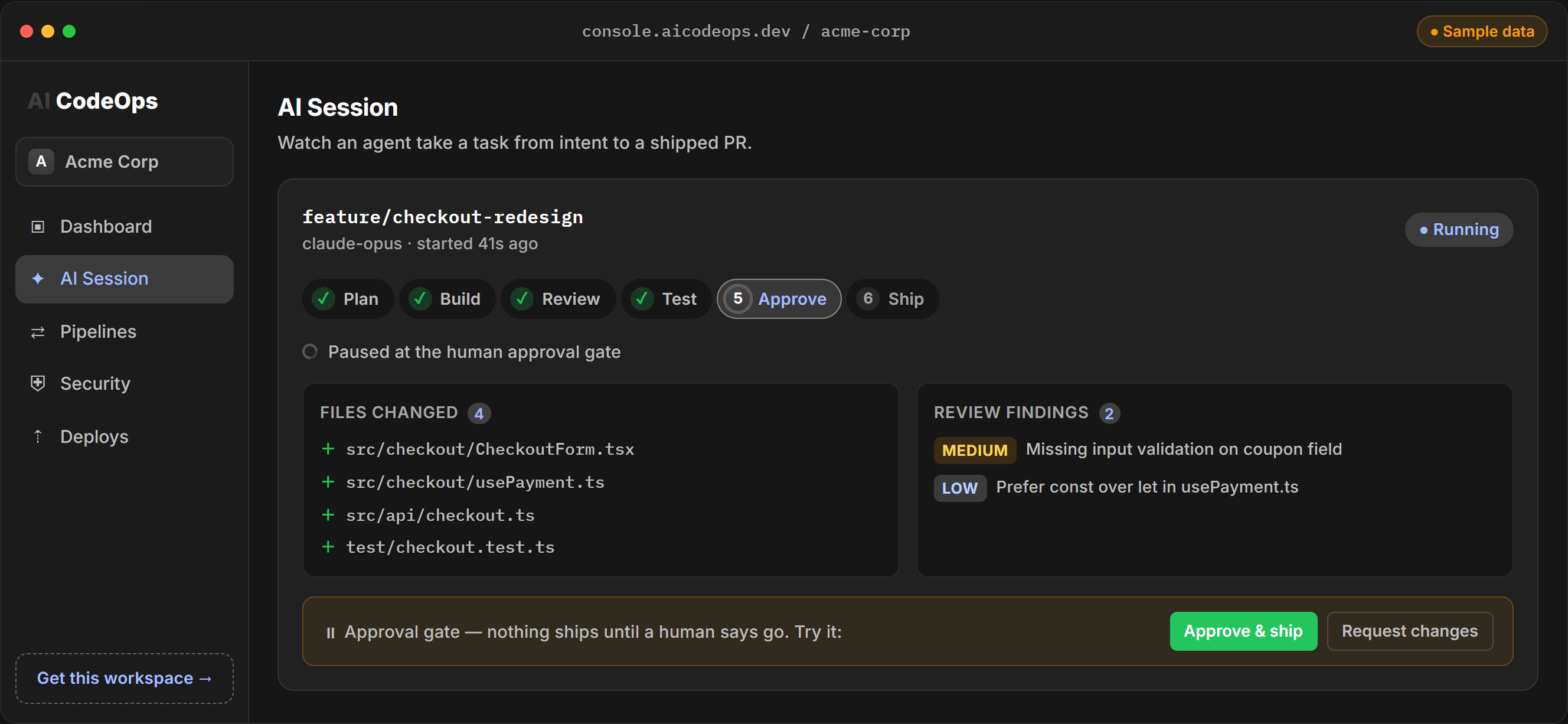
Interactive demo, sample data.
Findings from the real diff
The agent steps run before the code exists, so they review a description of the change. The findings review runs after the code pass and reads the diff itself. It must answer with a JSON array, and each item becomes a finding:
[
  {
    "title": "Coupon code is passed to the pricing query without validation",
    "severity": "high",
    "category": "security",
    "description": "applyCoupon() forwards the raw request value to the discount lookup.",
    "recommendation": "Validate length and characters before the lookup and return 400 on a bad code.",
    "filePath": "src/api/checkout.ts"
  }
]
Severity is critical, high, medium, low or info. Category is one of security, quality, performance, accessibility, compliance, dependency, documentation, test_coverage, reliability, cost, ux or other. A review records at most 12 findings. An empty array means the reviewer found nothing wrong.
An answer that is not a readable array, such as prose, a refusal or a reply cut off part-way, is not treated as a clean review. The run is marked as not reviewed and the gate holds the change until it is re-run. The same happens if the review fails or the budget runs out before it.
A finding's content is kept as the review wrote it. Only its triage status changes after that.
Triage
Findings appear on the session's page. Security findings also appear on the Security page. Each one has a status:
- Open, acknowledged or in progress: still to deal with. These block when the severity is high or critical.
- Fixed, won't fix, false positive or duplicate: dealt with. These never block.
Changing the status records who triaged it. Every finding and its final status goes into the change's signed evidence pack.
Quality gates involved
Review feeds the quality gate that runs before a pull request is opened and again before the console merges one. The gate denies the change when:
- the findings review did not complete;
- any finding of high or critical severity is open, acknowledged or in progress.
Your CI can ask the same gate about a pull request through /api/release/check, and set blockingSeverity to medium to block on medium findings too. Each blocking finding in that response names its severity, category, title, file and the agent it is attributed to. The full request and response are on the quality gates page.
A clean review is not enough on its own. The change also needs passing tests from the test stage and an approval from a person. The person who started the session cannot cast the approving vote while someone else in the workspace can approve.
What it is not
AI review is a second pair of eyes, not a replacement for a human reviewer. It reads the diff and the task, not a running application, and it only runs on changes made through AI CodeOps sessions. Pair it with your own tests, which AI CodeOps runs against each change in a sandbox.
Frequently asked questions
Does AI CodeOps review every pull request in my repository?
No. It reviews the changes made through AI CodeOps sessions. Pull requests people open directly on GitHub or another host are not reviewed, though your CI can still ask the release gate about them.
Do the review agents run in parallel?
No. Steps in a workflow run one after another, and each agent sees what the earlier ones wrote. The Parallel Review workflow gets its name from covering several review angles on the same change, not from running them at the same time.
Does the AI review read the actual code change?
Yes. After the agents finish and the code is written, a separate review step reads the diff itself and records structured findings. If that review cannot be completed, the change is held.
Which findings block a change?
Findings of high or critical severity that are still open, acknowledged or in progress. Once you mark them fixed, won't fix, false positive or duplicate, they stop blocking. A CI call to the gate can lower the threshold to medium.
Can the AI fix a finding for me?
Yes. Each finding has a Fix button that starts a new AI run aimed at that finding. Its change goes through the same review and gate.