Gated deploys for AI-written changes, with rollback records
AI CodeOps calls your deploy webhook only after an AI change passes the gate and is merged, records every deploy and rollback, and opens an incident on failure.
In AI CodeOps, the deploy stage starts when an approved AI change is merged from the console: AI CodeOps calls the project's deploy webhook, and your own pipeline builds and ships it. Every deployment and rollback is recorded against the change, failures open an incident, and the records feed your delivery metrics.
An AI agent that can merge its own code straight to production is a risk most teams will not take. In AI CodeOps, a change reaches your deploy pipeline only after it has passed tests, the findings review and a human approval, and the gate is checked again right before the merge. AI CodeOps never holds credentials for your servers or clusters.
Which agents run
Deploying is done by your pipeline, not by an agent. The agents work on the changes that lead up to it and on what happens after:
- DevOps Engineer: plans and applies infrastructure and pipeline changes in DevOps Change, including rollout and rollback steps, with a Security Auditor risk review in between.
- E2E Tester, Dependency Auditor and the Architect's go/no-go: the Release Readiness workflow before a release.
- Incident Responder and Site Reliability: triage and the postmortem in Incident Response, with the Builder writing the mitigation.
A fix from Incident Response goes through the same gate and approval as any other change.
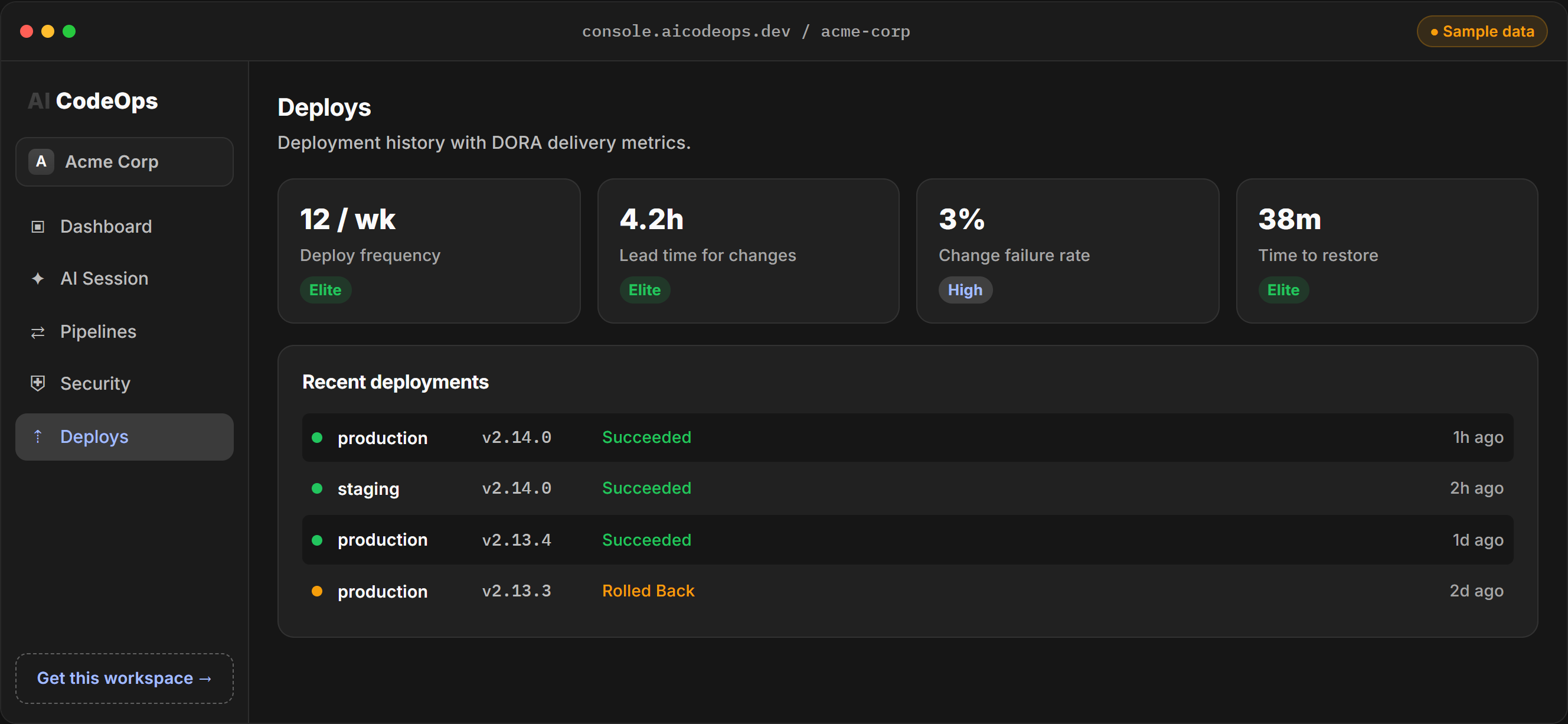
Interactive demo, sample data.
The path from change to deploy
- An AI session produces a change. Tests run against it in a sandbox, and the findings review reads the diff.
- The quality gate checks the result, and a person approves the change. If someone else can approve, it cannot be the person who started the session.
- AI CodeOps opens the pull request on your Git host.
- When the pull request is merged from the console, the gate is checked again before the merge.
- If the project has a deploy webhook, AI CodeOps calls it and records the deployment.
The gate fails closed. If a check errors, the merge or deploy does not happen.
Deploy webhooks
Each project can have a deploy webhook, set on the Deployments page (under Release): a public HTTPS URL, the environment it deploys to, such as staging or production, and an optional HMAC secret. Addresses on private networks are refused before anything is sent.
When a change is merged through the console, AI CodeOps sends a POST like this:
POST /hooks/deploy HTTP/1.1
Content-Type: application/json
X-CodeOps-Signature: sha256=5c1f0e9a7b2d4c6e8f0a1b3c5d7e9f2a4b6c8d0e1f3a5b7c9d2e4f6a8b0c1d3e

{"event":"pr_merged","workspaceID":"wrk_01JA8X2B4D6F8H0K2M4P6R8T0V","projectID":"checkout","repo":"acme/checkout","prNumber":42,"prUrl":"https://github.com/acme/checkout/pull/42"}
The signature header is only present when you set a secret. It is the hex HMAC-SHA256 of the raw body, keyed with your secret, so your receiver can check that the call came from AI CodeOps. If the receiver answers with a 2xx status, the deployment is recorded as in progress; otherwise it is recorded as failed, and you can retry it. Each retry is its own record. A release is recorded before the call goes out, so a merge that is reported twice is not deployed twice.
Deployment records
Every deployment, automatic or entered by hand, becomes a record with the project, the environment, the commit SHA, Git ref and version, who or what triggered it, and the session that produced the change. Its status is queued, in progress, succeeded, failed, rolled back or canceled. You can add deployments made outside AI CodeOps from the Deployments page or the API, so the history covers your whole release process.
Each change's page links its pull request and its deployment, and both go into the change's signed evidence pack.
Rollbacks happen in your pipeline. AI CodeOps does not redeploy an older version. Mark as rolled back on the Deployments page sets a succeeded or failed deployment to rolled back, and it counts toward your change failure rate. Only members whose role can manage deployments can change a record.
Failed deploys open incidents. When a deployment fails, AI CodeOps opens an incident linked to it. Failures in environments named prod, production, live or main get a higher severity. When an incident's fix is merged, the incident is resolved only once the fix has been deployed.
Quality gates involved
- The release gate before merge. A pull request a session opened is only merged from the console when its gate still passes: review complete, no blocking findings, no failing tests on the current version.
- Approval first. The change was approved before its pull request was opened, and editing its code afterwards resets that approval.
- Deploy policy. A
release.deployrule can allow or deny automatic deploys per environment, such asproduction. A denied deploy is recorded as canceled with the reason. A person retrying a deploy by hand is governed by their role instead. - Environment promotion from CI. A call to
/api/release/checkwithrequireDeployedTodenies a release that has no succeeded deploy in that environment yet.
Delivery metrics
The dashboard shows the four DORA metrics over the last 30 days, worked out from your deployment and incident records: deployment frequency, lead time from the session that started a change to its deploy, change failure rate, and time to restore. A deploy sent by webhook stays in progress until its status is updated, so keep statuses current or the metrics will undercount.
Frequently asked questions
Where does AI CodeOps deploy to?
It does not deploy to infrastructure itself. It calls a deploy webhook you set per project, signed with an optional HMAC secret, and your own pipeline does the deploy.
Does AI CodeOps roll back a failed deploy automatically?
No. Rollback happens in your own deploy pipeline. You then mark the deployment as rolled back in AI CodeOps, which keeps the record and counts it in your change failure rate.
Can a policy stop automatic deploys?
Yes. A workspace policy rule on release.deploy can allow or deny automatic deploys per environment. A denied deploy is not sent and is recorded as canceled, with the reason.
Can deploys require a human approval?
Not as a separate step today. The approval happens earlier, on the change itself, before its pull request is opened. Policies can allow or deny automatic deploys but cannot hold them for approval.
Can production be blocked until staging succeeded?
Yes, from your CI. A call to the release gate with requireDeployedTo set to staging denies the release unless the same change has a succeeded deployment there.